
🏁 Meet Information
Swim meets are held every Tuesday evening beginning with the Red & Black Meet.
In the event of inclement weather or delays, meets may be rescheduled to Wednesday evening of the same week.
🚩 First Meet Quick Guide
New to swim meets? Here’s what to do step-by-step.
- Arrive on time and check in with your swimmer’s age group
- Write swimmer number on shoulders and events on their arm
- Listen for event announcements
- Send swimmers to staging a few events early
- Celebrate, reset, and get ready for the next race
✅ Meet Entry Cut-Off
Meet entries close at 12:00 PM on the Sunday before each meet.
Please log into SwimTopia, click Calendar, and declare whether your swimmer is attending or not attending. Please also indicate whether they are available for relays, need to leave early, or cannot swim a specific stroke. This helps coaches plan accurate lineups, avoid empty lanes, and give the team the best chance to score points.
Important: If your swimmer cannot attend, must leave early, cannot swim a specific stroke, or is unavailable for relays, please note that in SwimTopia before the meet entry deadline.
How-To Video: Watch the SwimTopia attendance declaration tutorial
👕 Swim Meet Attire
- Suit: Red/black one-piece suit, jammers, or Speedo-style suit.
- Avoid loose suits: Loose suits create drag and can slow swimmers down.
- Swim caps: Optional but recommended, especially for swimmers with long hair.
- Goggles: Bring at least one extra pair in case of breakage.
📍 Meet Arrival & Check-In
Swimmer Check-In
Swimmers should arrive 15 minutes before warm-ups and check in with the kid pusher for their age group.
Volunteer Check-In
All volunteers should plan to arrive with their swimmer before warm-ups and check in at the volunteer table unless they are needed earlier for set-up.
Checking in lets the Volunteer Coordinator know you are present and ready to fulfill your volunteer duties. Please listen closely to overhead announcements for job-specific instructions.
⏱️ TimeDrop Timing System
Our team uses the TimeDrop Timing System during swim meets to help record swimmer times quickly and accurately.
During meets, volunteer timers may use handheld timing buttons connected to the TimeDrop system to capture official swim times.
- No prior experience is needed to volunteer as a timer
- Quick instructions and guidance will be provided on deck
- The system is designed to make timing simple, accurate, and efficient
Arrival Times
| Meet Type | Arrival Time |
|---|---|
| Red & Black Meet | Be at the pool by 5:15 PM |
| Home Meet | Be at the pool by 4:45 PM |
| Away Meet | Be at the pool by 5:15 PM |
Meet Start Time: 6:00 PM
Warm-Ups
Warm-ups are important because they prepare swimmers’ bodies for greater effort and reduce the risk of injury. All swimmers should plan to attend warm-ups before a meet.
- Home Meet Warm-Ups: 5:00 PM
- Away Meet Warm-Ups: 5:30 PM
🔴⚫ What Is the Red & Black Meet?
The Red & Black Meet is a mock meet. We are not swimming against another team, but the meet is run like a regular swim meet.
This meet helps new families learn how meets work before the season begins. Swimmers learn where to go, when to line up, and who to listen to. Parent volunteers also get a chance to practice their roles before real meets begin. This includes learning meet jobs such as timing using our new TimeDrop timing system.
The Red & Black Meet also gives swimmers racing experience and provides coaches with early season times, which helps with planning events and lineups.
✍️ Swimmer Number Markings
Please write your swimmer’s assigned number going down both shoulders.
Also write their first initial and last name on the back of their right shoulder.
Example:
- Number: 127
- Name: T. Otter
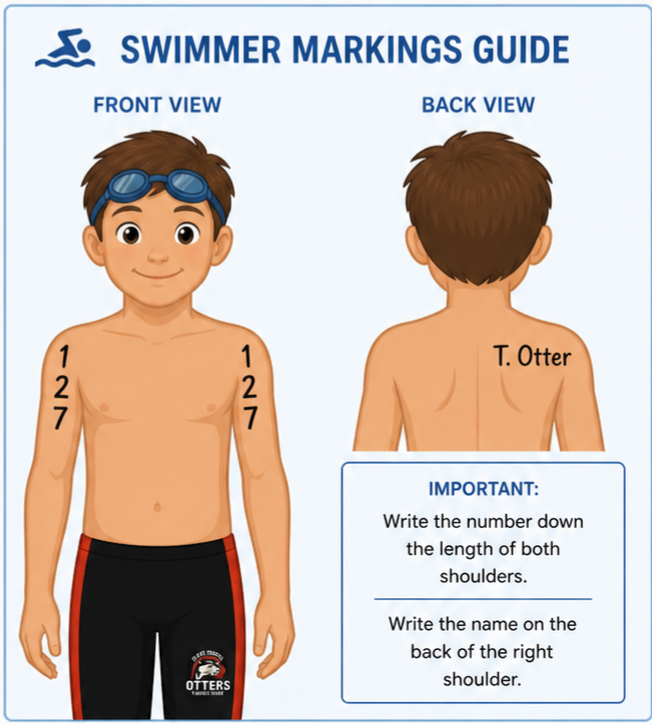
Example of swimmer number and name placement
🔁 What Is a Relay?
In our summer swim league, there are two relays. A relay has four swimmers who each swim either 25 or 50 yards, depending on age. 6 & Under swimmers do not swim in relays.
Relay Types
- Medley Relay: Each swimmer swims a different stroke in this order: backstroke, breaststroke, butterfly, freestyle.
- Freestyle Relay: All four swimmers swim freestyle.
The relays are the first and last events of the meet.
Relay Availability
When declaring your swimmer’s attendance in SwimTopia, you will be asked about relay availability. If your swimmer is not available for relays, select the “not available for any relays” option.
Relays are encouraged because they provide more swimming experience, help the team earn points, and are great team-bonding moments.
🏆 How Meets Are Scored
Swimmers earn points for the team based on their individual and relay finishes. Every swim matters, and every point helps the team compete!
Individual Event Scoring
- 1st Place: 5 points
- 2nd Place: 3 points
- 3rd Place: 1 point
Relay Event Scoring
- 1st Place Relay: 5 points
📌 Some Rules to Remember
- Coaches decide which events each swimmer will swim.
- Coaches decide which swimmers will participate in relays.
- Some swimmers may be asked to “swim up,” meaning they swim in an older age group.
- Swim-up decisions are made by coaches based on team needs, swimmer ability, and meet entries.
- If your swimmer cannot swim a specific stroke, must leave early, or cannot attend, please note this in SwimTopia before the meet entry deadline.
⏱️ Length of Meets
Please expect swim meets to last approximately 4–5 hours.
If you are volunteering at the meet, you may not leave until your duties are complete. If your swimmer finishes early, please plan accordingly.
🎒 What to Bring to Meets
For Swimmers
- Red/black team suit
- Swim cap, if desired
- At least one extra pair of goggles
- Two towels: one for drying off and one to sit on
- Water bottle
- Healthy snacks, such as fruit or granola bars
- Sweatshirt or jacket for staying warm between races
- Sharpie for event, heat, and lane markings
- Quiet activity, such as a book or card game
For Families
- Pop-up tent or umbrella for shade
- Folding chairs
- Cooler with drinks and snacks
- Sunscreen
- Blanket or mat for swimmers to rest between events
🌧️ Meet Weather Policy
- Light Rain: Meets may continue as long as conditions remain safe.
- Heavy Rain: If lifeguards can no longer see the bottom of the pool, swimmers may be asked to exit the water.
- Thunder & Lightning: Everyone must immediately clear both the pool and pool deck.
- Shelter: Families may take shelter under covered areas, but waiting in cars is recommended until it is safe to resume.
- Updates: Please watch email and the team Facebook page during inclement weather. Coaches will send updates about delays, cancellations, or rescheduling decisions.

